
If
your cell phone isn't getting the signal it should or your wireless
router isn't doing the job, you need to look at boosting the strength of
your signal. Increasing the strength isn't always easy but there are
several ways to do it depending on the source and what you’re
transmitting to. I'll go through several solutions that can help no
matter what kind of wireless device you’re using.
You May Have Everything You Need
The
solution to transmitting a stronger signal to and from your gadget
might be relatively simple overall. Sometimes it’s just a matter of
choosing the solution that works for you. Below are several options
that will work with any normal wireless device, with cell specific
options near the bottom.
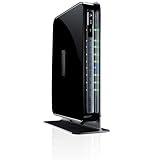
Upgrade the Router Itself
If
you’re not getting the wireless signal you need, you should first look
at the source of your connection. Not all wireless routers are equal in
either their signal strength or their wireless technology. If you're
using an older router it might help you the most to swap it out with a
router that’s designed to work well at more extended ranges as well as
using Wireless N technology. Even if you’re not using a gadget that's
designed to work at 'N' levels, a new router may be able to direct
signals to your device better or simply use the different frequency
channels more effectively.

Upgrade Your Antenna
If
it’s not the router itself that’s the issue, the likely culprit is the
antenna. Not all antennas are the same. There two different types of
antennas that are used in routers: Omnidirectional and Unidirectional.
Omnidirectional antennas are designed to send a signal out in all
directions. If you change over to a both a high gain and larger antenna
for your router your signal will go further to your gadget. Even though
you’re not increasing the signal strength of your gadget itself the
better antenna on the router will be able to detect and read signals at a
lower strength more effectively. A unidirectional antenna is designed
to either send or receive signals that are in a certain direction. A
satellite antenna is an example of a unidirectional antenna.
Unidirectional antennas work best when you have a particular zone you
know you’re sending and receiving signals from. If you’re directing
your efforts in that one direction, the antenna will have an easier time
with those signals. You can even DIY your normal antenna into being
unidirectional with a bowl and some tin foil.
Alternative Placement
Sometimes
it’s not directly the antenna itself that’s the problem, it’s the
location. Wireless signals travel through some materials easier than
others. Certain materials can weaken the signal, and others may
introduce interference making it even harder for the signal to get from
one place to another. Antennas always work best when you have a clear
line of sight from one point to another. You generally can't eliminate
walls from the equation but you can minimize the effect. There are
generally more objects lower to the ground then higher up, so put your
antenna in the highest point you can manage.
Repeat Everything
Sometimes
no matter what you do to boost the signal, it’s just not enough to get a
connection to certain spots. This is when a Repeater can be useful.
These are also marketed as range boosters can be either a wireless or a
wired device that speaks to your router and repeats everything that it
'hears' and will relay the messages from your router to your gadget and
vice versa. A wired repeater would be best for speed, and as such it is
much more common, but a wireless repeater can still be effective.

The Wired Option
Wireless
is great for the freedom that it gives, but nothing beats a wired
signal for both speed and consistency. It might not be an option for
all of your devices, but if you use a wired connection for some of your
devices, it might enable you to move the router and/or antenna to a new
location and help cover the other spots that need a bit more love.
Cell Phone Options
Cell
phones are a little different in that you don't control both ends of
the wireless connection. Things that technically could work just aren't
possible. That means you need to go straight to a signal booster to
improve your signal strength. Depending on where you need the increased
signal strength there are different options for you.
Getting Better Cell Signal Strength at Home
When
you need a signal booster at home it generally comes in a kit with two
pieces. Like a wireless router it consists of an antenna and box that
process the signals. If it’s an omnidirectional antenna the best place
for it is the highest spot that you can put it in. The roof is the best
place as it gives you the best chance for a clean line of sight to the
tower. If you’re using an unidirectional antenna simply pointing it
towards the tower where it has a clear line of sight is good enough. Put
the signal relay near the spot that will reach the most coverage and
your done.
Although not a true signal booster you can also get a device from your cell company that will use your internet connection rather then a connection to your local cell tower to improve your connection. Both can be quite effective at eliminating dropped calls and keeping your signal strength powerful.
Although not a true signal booster you can also get a device from your cell company that will use your internet connection rather then a connection to your local cell tower to improve your connection. Both can be quite effective at eliminating dropped calls and keeping your signal strength powerful.

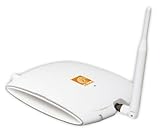
The Sleek cell booster
Source: Wilson Electronics
Getting Better Cell Signal Strength on the Move
Similar
to the signal relay that you can put in your home, if you need a signal
booster on the go you can also buy one for your car. Some of these are
permanent kits that you can attach to your car, but you can also get
temporary ones that have magnetic antennas that can be removed. Using
these larger antennas that are on the outside of the vehicle you can
relay the signal to the inside and keep yourself connected even in areas
that you would normally drop calls.

No comments:
Post a Comment